List
The List component in Kontra TUI is a vertical layout container that stacks components top-to-bottom - like a column - but respects each child's preferred height.
It's perfect for:
- Menus
- Multi-line text blocks
- Mixed or dynamic content
- Scrollable containers
Creating a List
Just pass your components to the constructor:
  auto list = std::make_shared<List>(
      item1,
      item2,
      item3
  );
You can add spacing between items using .set_gap(...):
list->set_gap(1);
Why Use List?
Unlike Flex(Column), List:
- Does not stretch children to match height
- Respects individual height from
get_preferred_height() - Works great for uneven or dynamic layouts
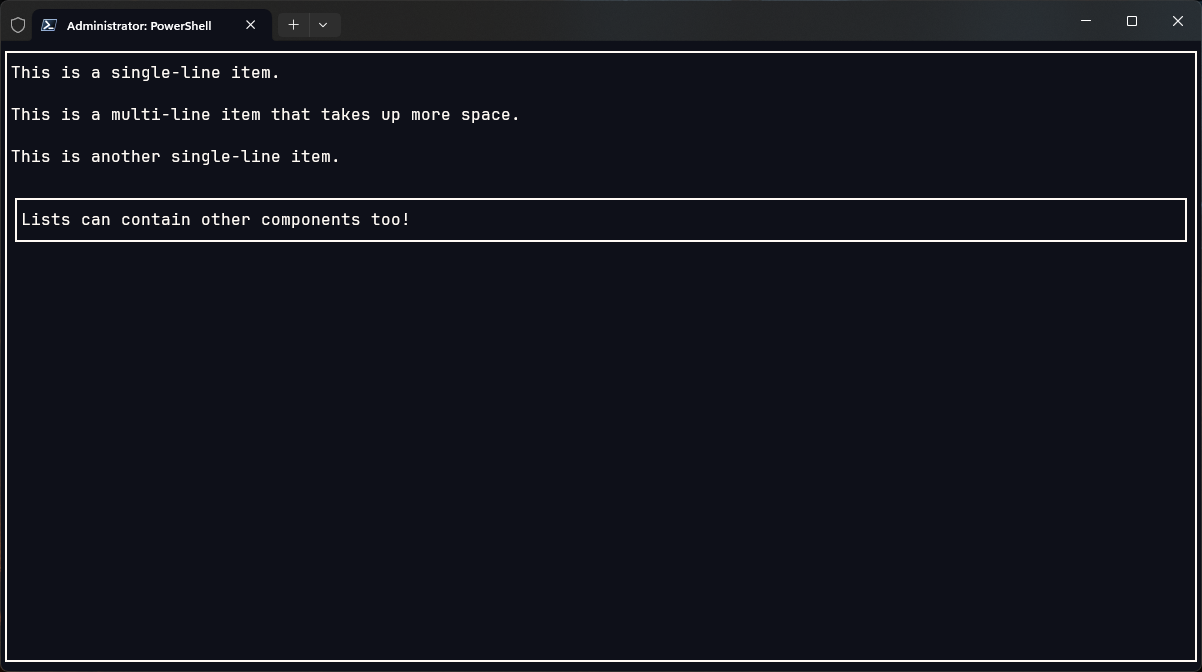
Mixed Content Example
List supports any component inside - including InputBox:
  auto item1 = std::make_shared<Text>("This is a single-line item.");

  auto item2 = std::make_shared<Text>("This is a\\nmulti-line item\\nthat takes up more space.");

  auto item3 = std::make_shared<Text>("This is another single-line item.");

  auto input_item = std::make_shared<InputBox>();
  input_item->set_text("Lists can contain other components too!");

  auto main_list = std::make_shared<List>(
    item1,
    item2,
    item3,
    input_item
  );

  main_list->set_gap(1);
Render on Screen (with Scroll Support!)
Wrap the list in a Screen + Border, and handle input:
  auto screen = std::make_shared<Screen>(
      std::make_shared<Border>(main_list)
  );

  kontra::run(screen, [&](const InputEvent& event) {
    switch (event.type) {
      case EventType::KEY_PRESS:
        input_item->handle_input(event.key);
        break;
      case EventType::MOUSE_SCROLL_UP:
        main_list->scroll_up();
        break;
      case EventType::MOUSE_SCROLL_DOWN:
        main_list->scroll_down();
        break;
      default:
        break;
    }
  });
Output
TL;DR
- Use
Listwhen vertically stacking components of uneven height - Supports mouse scroll out of the box!
- Combine it with
InputBox,Text,Button, etc. .set_gap()is your friend for spacing- Easily wrapped with
Borderand rendered viaScreen