Text
The Text component is one of the core building blocks in Kontra TUI. It's used to display plain or styled text — whether static, styled, or dynamic.
Basic Usage
Create a simple static Text component by passing a string:
auto static_text = std::make_shared<Text>("This is a static text component.");
This will display the text exactly as provided, with no styling or updates.
Styling with StyleBuilder
You can style your text with color, background, bold, italic, and more:
  auto styled_text_style = StyleBuilder()
      .set_color(ansi::FG_CYAN)
      .set_background_color(ansi::BG_BRIGHT_BLACK)
      .set_bold(true)
      .set_italic(true)
      .build();

  auto styled_text = std::make_shared<Text>(
      "This text is styled using the StyleBuilder.",
      styled_text_style
  );
.set_color(ansi::FG_CYAN)- Sets the foreground (text) color..set_background_color(ansi::BG_BRIGHT_BLACK)- Sets the background color..set_bold(true)- Makes the text bold..set_italic(true)- Makes the text italicized..build()- Finalizes the style and returns aTextStyleobject.
The StyleBuilder allows for chaining .set_...() methods and then calling .build().
Dynamic Text (Reactive)
You can pass a lambda ([](){}) instead of a string to make the text reactive.
It will re-evaluate every time the UI re-renders, allowing for real-time clocks, counters, etc.
For example, following shows a real time clock!
  auto dynamic_text = std::make_shared<Text>(
      []() {
          auto now = std::chrono::system_clock::now();
          auto time_t_now = std::chrono::system_clock::to_time_t(now);
          char time_str[100];

          #ifdef _WIN32
              tm local_tm;
              localtime_s(&local_tm, &time_t_now);
              strftime(time_str, sizeof(time_str), "%H:%M:%S", &local_tm);
          #else
              tm local_tm;
              localtime_r(&time_t_now, &local_tm);
              strftime(time_str, sizeof(time_str), "%H:%M:%S", &local_tm);
          #endif

          return "Reactive Time: " + std::string(time_str);
      },
      TextStyle(ansi::FG_GREEN)
  );
Layout Example
Here's a layout that combines static, styled, and dynamic Text components:
  auto layout = std::make_shared<List>(
      static_text,
      styled_text,
      dynamic_text
  );
  layout->set_gap(2);
Wrap the list with a border for a better visual:
  auto bordered_layout = std::make_shared<Border>(
      layout,
      BorderStyleBuilder()
          .set_title("Text Component Showcase")
          .build()
  );
Now simply adding it to the screen and rendering it!
  auto screen = std::make_shared<Screen>(bordered_layout);

  kontra::run(screen, [&](const InputEvent& event) {

  });
Output
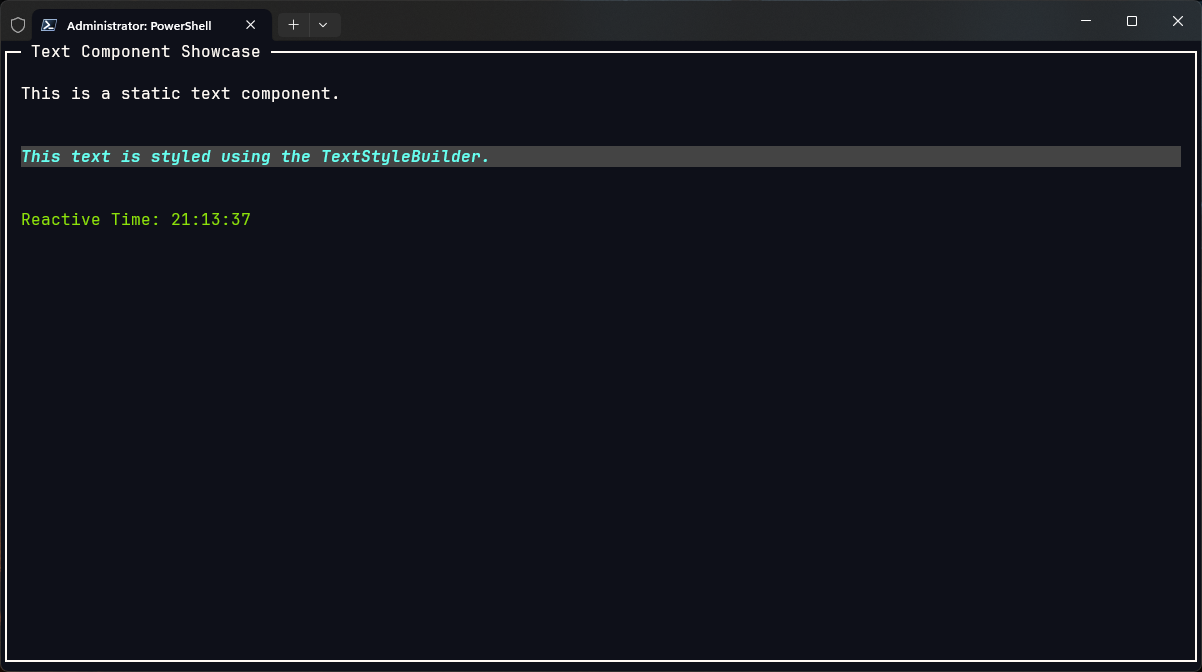
TL;DR;
- Use
Text("...")for static messages. - Use
Text(..., TextStyle(...))orStyleBuilderfor styling. - Use
Text([](){...})for dynamic, auto-updating content. - Combine with
List,Border, and state variables for beautiful layouts.
Whether you're building headers, feedback messages, or live clocks — Text is the backbone of Kontra's TUI rendering.