Radio Buttons
The RadioGroup component is used to present a list of options where only one can be selected at a time. It's perfect for settings, difficulty selection, or any single-choice scenario.
The design consists of two parts:
- A smart
RadioGroupcontainer that manages the state. - Simple, presentational
Radiobuttons that are managed by the group.
Like the Checkbox, the RadioGroup directly manipulates an integer variable in your application that represents the index of the currently selected option.
Creating a Radio Group
To create a RadioGroup, you need:
- A
std::vector<std::string>containing the labels for each option. - A pointer to an
intvariable that will store the index of the selected option.
  // 1. In your application, define the state variables
  std::vector<std::string> options = {"Option A", "Option B", "Option C"};
  int selected_index = 0; // 'Option A' is selected by default

  // 2. Create the RadioGroup, passing the address of your index variable
  auto radio_group = std::make_shared<RadioGroup>(options, &selected_index);
The RadioGroup will automatically create the individual Radio buttons and manage which one is checked based on the value of selected_index.
Styling a Radio Group
You style the RadioGroup by creating a RadioStyle and passing it to the constructor. This style will be applied to all the individual Radio buttons within the group.
The RadioStyle defines the appearance for a button's normal (not focused) and active (focused) states.
  // Define a style for when a radio button is NOT focused
  auto normal_style = TextStyleBuilder()
      .set_color(ansi::FG_WHITE)
      .build();

  // Define a style for when a radio button IS focused
  auto active_style = TextStyleBuilder()
      .set_color(ansi::FG_YELLOW)
      .set_background_color(ansi::BG_BRIGHT_BLACK)
      .set_bold(true)
      .build();

  // Combine them using the RadioStyleBuilder
  auto radio_style = RadioStyleBuilder()
      .set_normal_style(normal_style)
      .set_active_style(active_style)
      .build();

  // Apply the style to the radio group
  auto styled_group = std::make_shared<RadioGroup>(
      options,
      &selected_index,
      radio_style
  );
Handling Input
The RadioGroup component exposes its own methods for handling user input, which simplifies your main event loop.
Keyboard Interaction
The standard UX is to use arrow keys (Up/Down) to move focus and Spacebar or Enter to select the focused option.
  kontra::run(screen, [&](const InputEvent& event) {
      switch(event.type) {
          case EventType::KEY_UP:
          case EventType::KEY_LEFT:
              radio_group->focus_previous();
              break;

          case EventType::KEY_DOWN:
          case EventType::KEY_RIGHT:
              radio_group->focus_next();
              break;

          case EventType::KEY_ENTER:
          // You can also handle KEY_PRESS for ' ' (spacebar)
          case EventType::KEY_PRESS:
              if (event.key == ' ') {
                  radio_group->select_active();
              }
              break;
      }
  });
focus_next(): Moves the focus to the next radio button in the list (and wraps around).focus_previous(): Moves the focus to the previous button.select_active(): Sets your integer state variable to the index of the currently focused button.
Mouse Interaction
The RadioGroup also provides a single method to handle all mouse clicks within its bounds.
  if (event.type == EventType::MOUSE_PRESS) {
      // Delegate the click event to the group.
      // It will figure out which internal button was clicked.
      radio_group->handle_mouse_press(event.mouse_x, event.mouse_y);
  }
The handle_mouse_press method will automatically update both the focus and the selection to the clicked radio button.
Complete Example
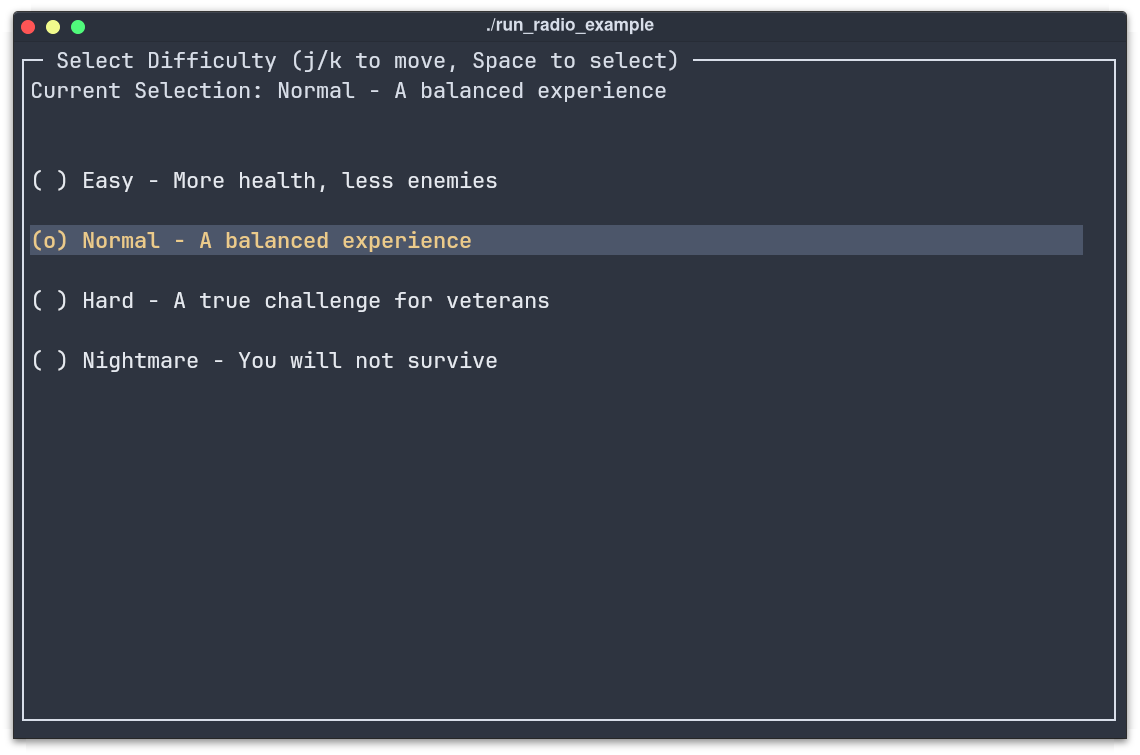
This example creates a "Select Difficulty" menu, a common use case for radio buttons.
  #include "../include/kontra.hpp"
  #include <vector>
  #include <string>
  #include <memory>

  int main() {
      // --- 1. Application State ---
      std::vector<std::string> difficulty_options = {
          "Easy - More health, less enemies",
          "Normal - A balanced experience",
          "Hard - A true challenge for veterans",
          "Nightmare - You will not survive"
      };
      int selected_difficulty = 1; // Start with "Normal" selected

      // --- 2. Define a Style ---
      auto radio_style = RadioStyleBuilder()
          .set_normal_style(TextStyleBuilder().set_color(ansi::FG_WHITE).build())
          .set_active_style(TextStyleBuilder().set_color(ansi::FG_YELLOW).set_background_color(ansi::BG_BRIGHT_BLACK).set_bold(true).build())
          .build();

      // --- 3. Create the RadioGroup Component ---
      auto radio_group = std::make_shared<RadioGroup>(difficulty_options, &selected_difficulty, radio_style);
      radio_group->set_gap(1);

      // --- 4. Create a dynamic text display to show the state ---
      auto display_text = std::make_shared<Text>([&]() {
          return "Current Selection: " + difficulty_options[selected_difficulty];
      });

      // --- 5. Layout ---
      auto layout = std::make_shared<List>(display_text, radio_group);
      layout->set_gap(2);

      auto screen = std::make_shared<Screen>(
          std::make_shared<Border>(layout,
              BorderStyleBuilder().set_title("Select Difficulty (Arrows/Space/Mouse)").build()
          )
      );

      // --- 6. Event Loop ---
      kontra::run(screen, [&](const InputEvent& event) {
          switch (event.type) {
              case EventType::KEY_UP:
              case EventType::KEY_LEFT:
                  radio_group->focus_previous();
                  break;
              case EventType::KEY_DOWN:
              case EventType::KEY_RIGHT:
                  radio_group->focus_next();
                  break;
              case EventType::KEY_ENTER:
              case EventType::KEY_PRESS:
                  if (event.key == ' ') {
                      radio_group->select_active();
                  }
                  break;
              case EventType::MOUSE_PRESS:
                  radio_group->handle_mouse_press(event.mouse_x, event.mouse_y);
                  break;
          }
      });

      return 0;
  }
Output
TL;DR
- Use
RadioGroupto manage a single selection from multiple options. - Provide a
std::vector<std::string>for the labels and a pointer to anintfor the selected index. - Use
focus_next(),focus_previous(), andselect_active()for keyboard control. - Use
handle_mouse_press()to delegate mouse clicks to the group.